In the previous post I introduced the Semantic Scholar MCP server. It gives coding agents structured access to academic paper search, citation graphs, author profiles, and BibTeX export. The post showed what the tools can do, but it didn’t answer the obvious question: does a domain-specific MCP actually help, or is a general-purpose agent good enough?
To find out, I ran a controlled experiment. Same prompt, same model (Claude Code, Opus 4.6, 200k context), two independent runs. The first run without and the second with the Semantic Scholar MCP server:
Find the first journal paper by Ante Kapetanovic and extract all references from that paper.
Both runs found the same paper: Kapetanovic, Susnjara & Poljak, “Stochastic analysis of the electromagnetic induction effect on a neuron’s action potential dynamics,” Nonlinear Dynamics, 2021. Ground truth: 68 references, exported directly from Springer’s RIS file.
Here’s what happened.
Results at a Glance
| Metric | Without MCP | With MCP |
|---|---|---|
| Recall | 85.3% (58/68) | 100.0% (68/68) |
| Precision | 100.0% | 100.0% |
| Missing references | 10 | 0 |
| Tool calls (total) | 40 | 14 |
| Tool calls (failed) | 30 | 6 |
| Tool success rate | 25.0% | 57.1% |
| Distinct failure types | 12 | 3 |
| Assistant turns | 30 | 10 |
| Side effects on environment | 3 | 0 |
100% vs 85.3% recall. 3x fewer tool calls. 5x fewer failures. Zero side effects.
What Happened Without MCP
The agent had access to WebSearch, WebFetch, Bash, and Read. No domain-specific tools.
Finding the author (five turns)
The agent started by searching the web for “Ante Kapetanovic” and cross-referencing results across Google Scholar, ResearchGate, and university websites. It followed links, parsed unstructured HTML, and tried to piece together a publication list from fragments of web pages. Five turns of searching and filtering to answer a question that has a one-call answer.
The failure spiral (17 turns)
Once the agent identified the paper, it needed to extract 68 references. This is where things fell apart.
Springer returned HTTP 303 redirects on every attempt to fetch the paper page for five times. ResearchGate returned 403. Google Scholar returned raw JavaScript instead of rendered content. The Semantic Scholar REST API blocked the references field at the publisher’s request. A downloaded “PDF” turned out to be HTML. The agent then installed pypdf into the project’s virtual environment to try parsing it. Python environment issues consumed four more attempts: wrong venv, missing pip, module not found.
Seventeen consecutive failed attempts. Twelve distinct failure types. 75% of all tool calls in the entire session failed.
The workaround (six turns)
The approach that finally worked: download Springer’s raw HTML with curl using a browser User-Agent header, then parse it with Python regex. This extracted 58 of 68 references. The last 10 were hidden behind Springer’s lazy-loading and never reached the parser.
Collateral damage
The agent left behind one installed pip package and two temporary files on disk. Not catastrophic, but not clean either. For a workflow that might run repeatedly, for example, extracting references from a batch of papers, these side effects compound.
What Happened With MCP
The agent had access to the same baseline tools plus the Semantic Scholar MCP server (14 tools for papers, authors, citations, references, and recommendations).
Finding the author (single turn)
Two parallel search_authors calls (I have a publishing track record with two different lastnames) returned structured records with paper counts, h-indices, and DBLP aliases. The agent immediately spotted that there were two duplicate profiles for the same person.
Finding the paper (single turn)
Two parallel get_author_details calls returned complete publication lists with venue types, dates, and journal metadata. The agent picked the earliest entry marked as a journal article of the two runs.
Hitting the same wall (two turns)
Reference retrieval hit the same publisher restriction. Springer blocks the references field in the Semantic Scholar API for this paper. The agent tried three variations of get_paper_references and confirmed the block. It then tried WebFetch on the Springer page and got the same 303 redirects.
The pivot (two turns)
Instead of spiraling through twelve different failure modes, the agent reached the Crossref API via WebFetch in two turns. Crossref returned all 68 references as structured JSON with full metadata. No regex parsing. No HTML scraping. No environment modifications.
No packages installed, no temporary files created, and no environment modified.
Side-by-Side
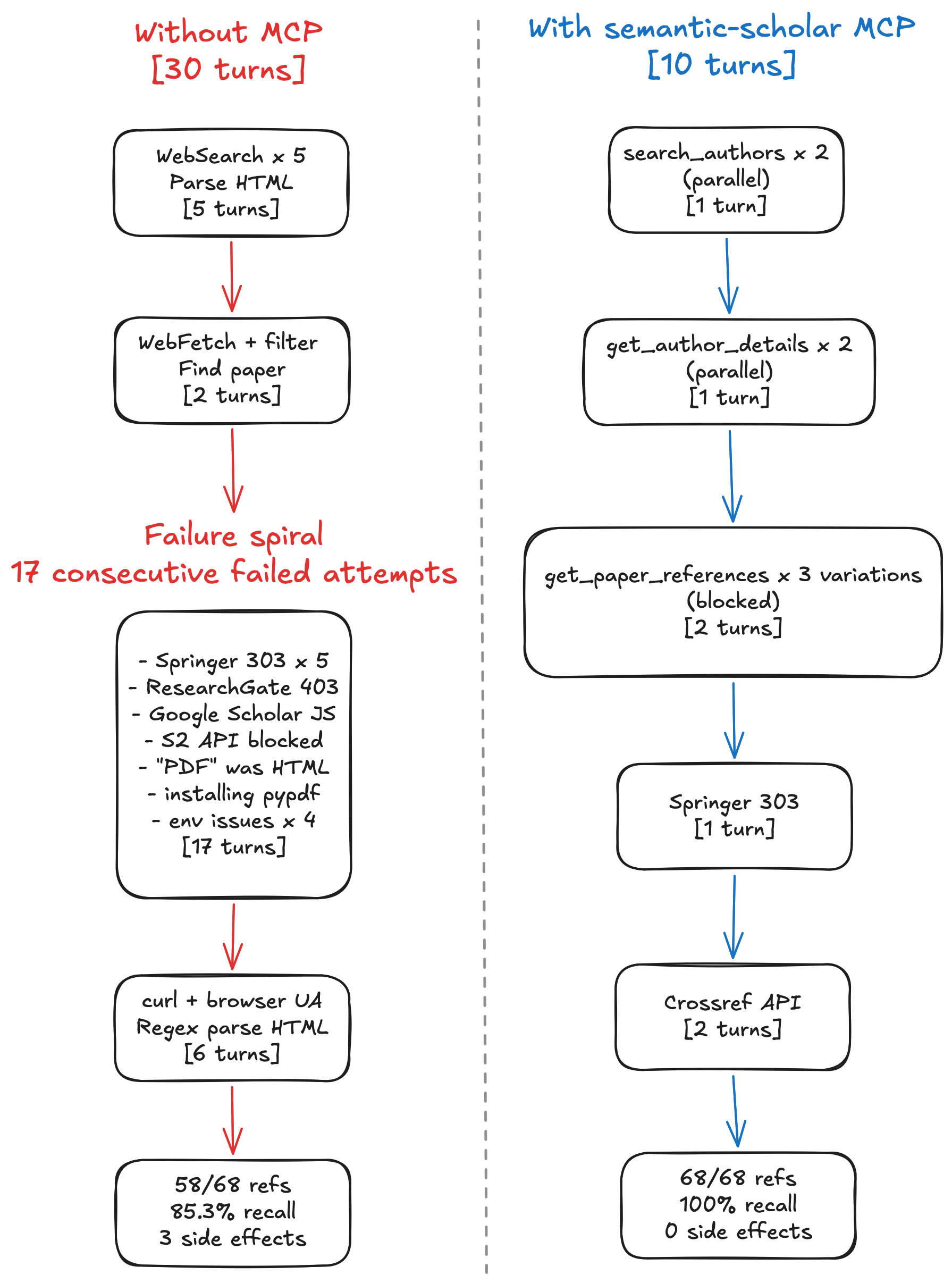
Why MCP Worked Better
Structured discovery replaced guesswork
Without MCP, finding an author means searching the web, following links, and parsing unstructured HTML across multiple sites. The agent spent five turns of chasing fragments of information scattered across Google Scholar, ResearchGate, and deprecated university pages.
With MCP, search_authors returns structured records in one call. The agent gets paper counts, citation metrics, and cross-database identifiers immediately. It can spot duplicate profiles and choose the right one without guessing. What took five turns of trial and error became one turn with a purpose-built tool.
The same pattern held for finding the paper. Without MCP: two more turns of filtering through unstructured HTML to find the earliest journal article. With MCP: get_author_details returned a typed publication list. One call, one answer.
Fewer tools means fewer failure modes
The without-MCP agent encountered 12 distinct failure types: HTTP 303 redirects, HTTP 403 blocks, JavaScript-rendered pages, API restrictions, format mismatches (HTML disguised as PDF), package installation failures, virtual environment conflicts, and more. Each failure type required its own diagnosis and workaround attempt.
The MCP agent encountered three failure types, all caused by a single root problem: Springer restricts reference data across all APIs, including Semantic Scholar’s. When your tools are purpose-built for a domain, there are simply fewer things that can go wrong. The agent doesn’t need to deal with HTML parsing, file format detection, or package management as it works with structured data from the start.
Fast failure leads to faster recovery
Both approaches eventually needed to leave the Semantic Scholar ecosystem because of Springer’s publisher block. The MCP agent diagnosed this in three calls and pivoted to Crossref within two turns. Total time in the failure zone: four turns.
The without-MCP agent spent 17 turns on dead ends before finding a workaround. And HTML regex scraping turned out to be lossy, missing the last 10 references behind lazy-loading. Slow failure didn’t just waste turns, it led to a fundamentally worse result.
No collateral damage
The without-MCP agent installed pypdf into the project’s virtual environment and left two temporary files on disk. These are recoverable side effects, but they shouldn’t happen at all. A research tool that modifies your development environment is a research tool you can’t trust to run unattended.
The MCP agent left zero trace. Every interaction was a stateless API call that returned structured data. For research workflows that run repeatedly across papers and sessions, zero side effects matter.
Limitations
This is an N=1 experiment with one task, one model, and one paper. The results are directionally interesting but not statistically conclusive. A proper benchmark would need dozens of tasks across different domains and publishers.
Both approaches hit the same fundamental constraint. Springer blocks reference data from the Semantic Scholar API. The MCP cannot override publisher restrictions. In both cases, Crossref served as the successful fallback.
Conclusion
The Semantic Scholar MCP turned a 30-turn, 40-call task with 85% recall into a 10-turn, 14-call task with 100% recall. It reduced failed tool calls by 80% and eliminated all side effects on the development environment.
The MCP didn’t solve everything. The same publisher restriction blocked both approaches. But it gave the agent structured, domain-specific tools that fail fast and fail cleanly. Instead of spending most of its effort fighting web infrastructure, the agent spent its effort on the actual research task.
This is what domain-specific MCP servers provide: less time debugging HTTP errors and parsing HTML, more time doing research.
Links: previous post, GitHub repo.